try it yourself
Start with a real pod. Then choose your path.
Read three events from a public pod. No account or installation needed. Then build a client, read the contract, or run a pod yourself.
Query and follow the data
curl -X POST https://sempods.org/aaltra/_system/sparql/query \
  -H "Content-Type: application/sparql-query" \
  -H "Accept: application/sparql-results+json" \
  --data 'PREFIX schema: <https://schema.org/>
SELECT ?e ?name ?start WHERE {
  ?e a schema:Event ; schema:name ?name ; schema:startDate ?start
} ORDER BY ?start LIMIT 3'
The response contains e, name and start. Open one of the event URIs in e to read its JSON-LD description. The venue keeps the data; your client can use it.
Build an app Implement the contract Run a pod
Build against a pod
Use HTTP and JSON-LD directly, or start with the JVM client. The Kotlin 0.2.0 release is on Maven Central. Select one BOM version for the modules you use:
dependencies {
  implementation(platform("org.sempods:sempods-bom:0.2.0"))
  implementation("org.sempods:sempods-client")
}sempods-client: HTTP, JSON-LD text, bytes, SPARQL results and OAuth helpers; Java 21+.sempods-client-rdf4j: RDF4J models and values; Java 25+.sempods-client-media: binary media operations; Java 21+.sempods-control-plane-client: host administration; Java 21+.
Read a public resource
Set podUrl to the full pod URL and resourceIri to a resource in that pod. The snippets use org.sempods.client.* and okhttp3.OkHttpClient. Install the client policy once:
val http = SempodsOkHttp.install(OkHttpClient.Builder()).build()Bind a session and read the resource. Check the status before using the body:
val session = SempodsSession(SempodsPodBase.of(podUrl))
val pod = SempodsPod(session, http)
val result = pod.resources().getText(resourceIri)
if (result.status == 200) {
  val jsonLd = checkNotNull(result.body)
  println(jsonLd)
}
These snippets come from the tested release source. The complete test supplies the imports and a local HTTP fixture.
For private data, choose delegated access when acting for a person, or service access for a backend acting as itself. Service registration and owner consent are experimental Kotlin 0.2 extensions.
Coming from 0.1? The client API changed, and RDF4J and media moved into separate adapters. Read the migration guide before raising the BOM.
JVM client guide Connect an agent
Implement the open contract
The development specification defines the public contract: authorized RDF access, HTTP CRUD, SPARQL and retrieval, with optional modules such as MCP and media. It can be implemented in a different language or on a different store.
Choose a complete specification revision. Core and modules version independently of each other and of Kotlin. A 0.1-dev label needs its source commit to identify what you implemented.
The normative text already determines the contract. Proposals describe possible changes; they do not change the requirements. A product conformance suite remains unfinished, so document known deviations.
Explore the HTTP surface Select a revision Read governance
Compose or run a pod
sempods-kotlin supplies reusable services and libraries. A deployment chooses their implementations and configuration. Start with the release's local quick start to run the development composition with Java 25 and Docker Compose.
That composition supports development and evaluation. A concrete deployment owns backups, version transitions and recovery; the supplied stack has no supported upgrade path. Read deployment responsibilities before using it for persistent data.
AI routes are disabled unless a provider is configured. Media and identity also depend on your chosen composition. The release guides explain the settings rather than assuming every service is needed.
Choose services Explore the building blocks
Explore before operating anything
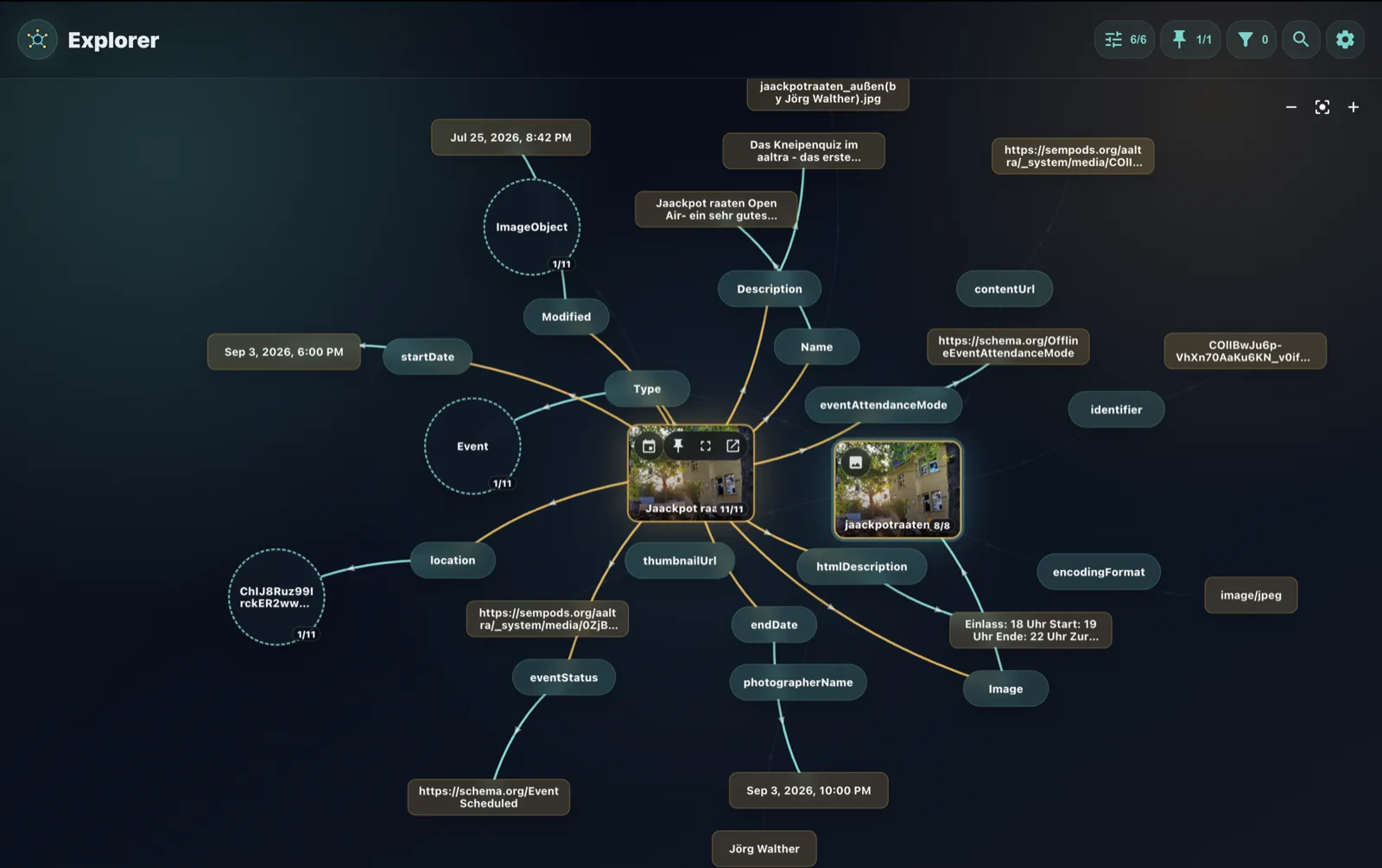
Explorer is an experimental graph browser. Point it at a public pod to see resources and links together. A preview app's availability is separate from the Kotlin release.
Need a test pod or a starting point for your own setup? Write to hello@sempods.org. Hosting is arranged manually; there is no public hosting dashboard.